
Demonstration Centre
Using the Leveluk SD501 DX
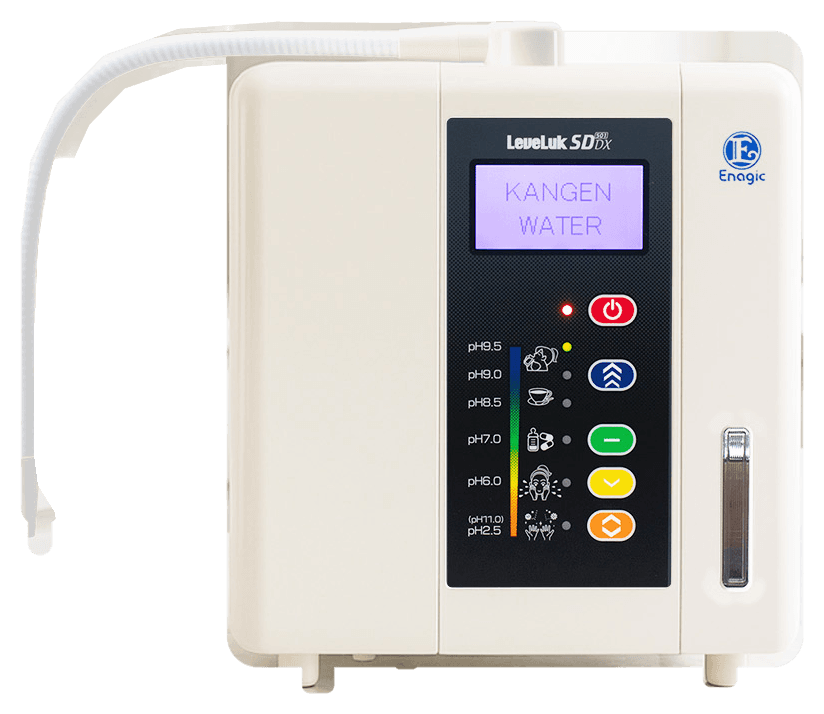
7 subjects, written from the Leveluk SD501 DX's published specifications and from what is true of every countertop ionizer.
This site does not publish a full operation manual for the Leveluk SD501 DX. Where a detail belongs to your particular unit — which button makes which water, how long a cartridge lasts, how often it wants more than its automatic clean — this guide says so plainly and sends you to the manual, to the support centre and to an authorized Enagic representative, rather than guessing.
These guides are for product education. Always follow the operation manual supplied with your unit and official Enagic guidance.
Getting started
When the machine arrives
Step 1. Check the machine against the contents list printed in your box before anything else.
Step 2. Read the operation manual supplied with your unit. It is the only document that describes this machine's own panel and start-up sequence.
Step 3. Decide where it will live. The Leveluk SD501 DX measures 264 × 338 × 171 mm and weighs 5.4 kg, so it wants a level worktop near the tap and a power outlet.
Step 4. If you would rather not set it up alone, an authorized Enagic representative can do it with you.
This site does not publish the Leveluk SD501 DX's start-up sequence. Where these steps and your manual differ, the manual is right.
Using your machine
Drawing water
Step 1. Set the diverter on your tap so water is sent through the machine rather than straight to the sink.
Step 2. Choose the water you want on the control panel.
Step 3. Open the faucet and draw the water.
Step 4. Close the faucet when you have finished, and let the automatic cleaning finish before you draw again.
Button names and panel layouts differ from model to model, and the Leveluk SD501 DX's are not published here — take them from the operation manual supplied with your unit.
Installation
Connecting it up
Step 1. The Leveluk SD501 DX is a countertop machine that connects to the kitchen tap.
Step 2. Fit the diverter to the tap as the manual describes, so water can be sent either through the machine or straight to the sink.
Step 3. Plug the unit into a standard outlet — it draws 230 W, multi-voltage.
Step 4. Check that it sits level and that nothing is pulling on its connections.
Tap threads vary. If the diverter will not fit yours, ask an authorized Enagic representative before you buy adaptors — the support centre has the ways to reach one.
Water settings
The five water types
Step 1. Strong Kangen Water, pH 11.0 (Not for drinking). A strong alkaline water for cleaning and food-preparation tasks around the home — not intended for drinking.
Step 2. Kangen Water, pH 8.5 – 9.5 (For drinking). Mildly alkaline water for everyday drinking and cooking — the heart of the Enagic hydration routine.
Step 3. Clean Water, pH 7.0 (For drinking). Filtered, pH-neutral water for moments when you want a clean, neutral glass.
Step 4. Beauty Water, pH 4.0 – 6.0 (Not for drinking). A mildly acidic water often used as a toner in beauty routines — for external use, not for drinking.
Step 5. Strong Acidic Water, pH 2.7 (Not for drinking). A strongly acidic water for cleaning and household hygiene tasks — not intended for drinking.
The SD501 DX publishes a pH range of 2.5 – 11.5 and makes all five water types, with a large LCD panel and voice confirmation in eight languages. Which button makes which water, and what the strong waters need before they can be made, is set out in the operation manual supplied with your unit — not on this page.
Cleaning
Keeping it clean
Step 1. Let the automatic cleaning finish before you draw water again.
Step 2. Do not drink water discharged during a cleaning cycle.
Step 3. Wipe the outside with a soft, dry cloth.
How often the Leveluk SD501 DX needs anything beyond its automatic cleaning depends on your water supply, and no interval is published here. The operation manual supplied with your unit gives it.
Filter replacement
Filters
Step 1. Watch for the filter reminder — the Leveluk SD501 DX has smart filter technology that keeps count for you.
Step 2. Fit a genuine Enagic cartridge for this model.
Step 3. Follow the replacement procedure in the operation manual supplied with your unit.
No cartridge life is published for the Leveluk SD501 DX on this site. Take the figure from your manual, or ask an authorized Enagic representative.
Troubleshooting
If something is not right
Step 1. Write down exactly what happens: what is on the display, what the flow is like, and which setting you were on.
Step 2. Check the simple things first — the diverter position, the tap fully open, and whether a filter reminder is showing.
Step 3. Look the symptom up in the operation manual supplied with your unit.
Step 4. If it is not there, contact an authorized Enagic representative or Enagic Philippines service rather than opening the machine.
The Leveluk SD501 DX carries a 5-year limited warranty. Confirm what service is covered with Enagic Philippines before any repair.
The other guides
Reading across the range.
In person
See the Leveluk SD501 DX run.
An authorized Enagic distributor will take you through the machine at the bench — the settings named as they are poured, and your own questions answered.